

Planning a trip to Japan is exciting, but figuring out your mobile data needs can be confusing. This guide breaks down exactly how to calculate what you need — and, just as importantly, why Japan quietly eats more data than you’d expect — so you can pick the right plan and never get stranded offline mid-trip.
The Quick Answer: Data Recommendations for Japan
- Light User (Up to 1 GB per day): You primarily use data for maps, messaging, and light browsing. A plan with 7-10GB is perfect for a 10-day trip.
- Moderate User (1-2 GB per day): You do everything a light user does, plus regularly post on social media (including stories) and stream some music. Aim for 15-20 GB for a 10-day trip.
- Heavy User / Family (3+ GB per day): You stream videos, make frequent video calls, upload high-resolution photos/videos, or are sharing a connection with family. Unlimited data is your best and most stress-free option.
If you’re not sure which category you’re in, the honest answer is usually “more than you think.” Japan is not a place where you casually know your way around — you’ll check Google Maps more times in a single Tokyo morning than you normally do in a week at home.
Japan Wireless offers truly unlimited data with no speed throttling, no data caps.
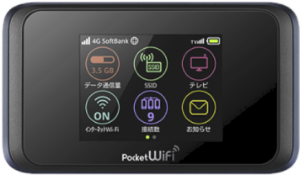
PREMIUM WIFI
FROM $4.2/DAY
- Unlimited Data, No Throttling
- Power bank provided for free!
- 10-hour battery life
- Connect up to 10 Devices
Why Japan Uses More Data Than Your Normal Routine
At home, you spend most of the day on WiFi. The cellular data on your monthly bill is really just commutes and errands — a fraction of your total screen time. In Japan, you are on cellular data for most of the day.
The train from Tokyo Station to Kyoto is two and a half hours. The walk from Kyoto Station to Fushimi Inari is 30 minutes through streets where you need Google Maps to stay on track. Menus outside tourist-heavy areas are Japanese-only, which means Google Translate camera mode every time you sit down. Signage is bilingual in major cities but often Japanese-only on local lines.
Some travellers call this the “Japan data tax.” You arrive expecting to use your phone about as much as you do at home, and you leave having burned through twice as much — because you were navigating an unfamiliar city in a language you don’t read.
The practical rule: add roughly 20–30% to whatever you estimate from your home usage.
Understanding Your Daily Data Usage in Japan
Different apps consume data at vastly different rates. Knowing where your gigabytes go is the first step to choosing the right plan. Here’s a typical breakdown of data consumption for common travel activities.
As you can see, navigation and messaging use very little data, while video streaming and social media uploads are the biggest consumers.
| Activity | Data Consumption (Approximate) |
|---|---|
| Navigation (Google Maps/Apple Maps) | 10-20 MB per hour |
| Messaging (WhatsApp, LINE, iMessage) | 1-5 KB per text message (very low) |
| Web & Email Browsing | 50-100 MB per hour |
| Social Media (Instagram/Facebook) | 150-300 MB per hour (scrolling feeds) |
| Uploading Instagram Stories/TikToks | 10-50 MB per minute of video |
| Music Streaming (Spotify/Apple Music) | 80-150 MB per hour (high quality) |
| Video Calling (FaceTime/WhatsApp) | 200-300 MB per hour |
| Video Streaming (YouTube/Netflix) | 350 MB (SD) to 1.5 GB+ (HD) per hour |
| Cloud backup (iCloud / Google Photos) | Several GB/day if backing up over cellular |
| Remote work (Zoom / Google Meet) | 600 MB–1 GB per hour |
Two of these catch people out. Google Translate camera mode needs a live connection every single time you point it at a menu or sign — and in Japan that’s dozens of times a day. And automatic cloud backup is often left on by default: a single day of shooting in Kyoto can quietly upload several gigabytes in the background. A 45-minute Zoom call, meanwhile, uses more data than a full day of casual navigation.
How Much Data by Trip Length
These figures assume a typical tourist mix of maps, translation, social media, and messaging — not heavy streaming or sustained remote work.
| Trip length | Light user | Average tourist | Heavy user / group |
|---|---|---|---|
| 3 days | 2–3 GB | 5–6 GB | 9 GB+ |
| 7 days | 5–7 GB | 11–14 GB | 21 GB+ |
| 10 days | 7–10 GB | 15–20 GB | 30 GB+ |
| 14 days | 10–14 GB | 21–28 GB | 42 GB+ |
| 21 days | 15–21 GB | 32–42 GB | 63 GB+ |
| 30 days | 22–30 GB | 45–60 GB | 90 GB+ |
Video, video calls, cloud backup, and multiple devices all push these numbers higher. If you’re travelling with someone who shares your connection, roughly double the figure.
The Japan Data Calculator: Which Traveler Type Are You?
Find the profile that best matches your travel style to estimate your data needs for the entire trip.
The “Essentialist” Traveler (Light User)
- Who you are: You use your phone for the essentials: Google Maps to navigate the Tokyo subway, WhatsApp to message family, and occasional web browsing to check restaurant reviews. You connect to hotel WiFi in the evenings.
- Typical Daily Usage: 500 MB – 1 GB
- Recommendation for a 14-day trip: A 15 GB plan will be enough.
The “Social Sharer” Traveler (Moderate User)
- Who you are: You do all the essential tasks, but you also love sharing your journey. You post photos to your Instagram feed, upload video stories, and stream Spotify.
- Typical Daily Usage: 1.5 GB – 2 GB
- Recommendation for a 14-day trip: Look for a 30 GB plan. This gives you plenty of buffer without worrying about running out.
The “Always-On” Traveler or Family (Heavy User)
- Who you are: You are a content creator, a remote worker, or a family traveling with multiple devices (phones, tablets). You stream videos for the kids, take long video calls, upload high-res videos to YouTube, and need a constant, reliable connection for everyone.
- Typical Daily Usage: 3 GB+
- Recommendation for a 14-day trip: Don’t even consider a limited plan. An unlimited data pocket WiFi is the most cost-effective and stress-free solution. It allows multiple users to connect simultaneously without worrying about hitting a data cap.
How to Check Your Own Data Usage (iOS & Android)
The best way to estimate your future data needs is to understand your past usage. Your smartphone already tracks which apps consume the most data. Check your usage on a typical day to get a personalized baseline before your trip.
For iPhone (iOS) Users
- Go to Settings.
- Tap on Mobile Service.
- Scroll down to the “Mobile Data” section. You will see a list of all your apps with the amount of data each has used under its name.
- This list shows usage for the “Current Period.” To get a clear picture, you can scroll to the very bottom and tap Reset Statistics at the beginning of a normal day, then check back 24 hours later.
For Android Users
The steps/menu can vary slightly depending on your phone’s manufacturer (e.g., Samsung, Google Pixel), but the process is generally similar.
- Go to Settings.
- Tap on Network & internet (or Connections).
- Select Data usage or Mobile data usage.
- Here you can view a graph of your total usage for a specific period and a ranked list of which apps have consumed the most data.
Common Mistakes That Leave Tourists Short on Data
“I only use Google Maps, so I don’t need much.” Maps aren’t heavy per search, but in Japan you search 20–30 times a day. Add translation for every meal and sign and “just maps” is already 500 MB before you open Instagram once.
Forgetting about iCloud and Google Photos. Auto-backup is often on by default and quietly uploads every photo and video over cellular. A single day of shooting in Kyoto can be hundreds of high-resolution files. Turn cellular backup off before you fly.
Assuming hotel WiFi covers the trip. It covers the hours you’re at the hotel. The 12 hours you’re out exploring are entirely on your data plan.
Buying four individual eSIMs for a family. That costs more than one shared Pocket WiFi, with four setups, four compatibility checks, and four things that can go wrong.
Buying the smallest plan “to see if it’s enough.” If you run out in rural Japan on day 5 of a 10-day trip, you can’t easily top up at a convenience store. Cutting it close is a gamble that frequently loses.
Pro Tips to Save Data on Your Japan Trip
Even with a generous plan, it’s smart to be efficient.
- Download Offline Maps: Before you leave, download maps of Tokyo, Kyoto, and Osaka in the Google Maps app. This allows for navigation with almost zero data usage.
- Adjust App Settings: Set apps like Instagram and TikTok to not pre-load videos on cellular data. Change your photo backup settings and automatic app update to “WiFi only.”
- Pre-download Entertainment: Download your favorite Netflix shows, YouTube videos, and Spotify playlists before you leave your hotel.
Frequently Asked Questions
- Is 10 GB of data enough for a week in Japan?
-
For a light user focused on maps and messaging, 10 GB is likely sufficient for 9-10 days. However, if you plan to surf social media or stream content, you may run out. An unlimited plan would be safer and offer a peace-of-mind trip.
- Do I really need unlimited data in Japan?
-
If you are traveling in a group, rely on video for work or social media, or simply want peace of mind, then yes. Unlimited data removes all anxiety about tracking usage and allows you to use your devices just like you do at home.
- Is it better to get a pocket WiFi or an eSIM for Japan?
-
It depends on your needs. For a solo, light user with a compatible phone, an eSIM is a great, convenient option. For families, groups, or anyone with multiple devices or high data needs, a pocket WiFi is almost always the superior and more economical choice.
Conclusion: Stay Connected, Stay Stress-Free
Choosing the right amount of data comes down to your personal travel style. By using our guide and understanding your options, you can make an informed decision.
For the ultimate peace of mind and the power to connect all your devices without limits, an unlimited data pocket WiFi remains the top recommendation for most visitors to Japan. It ensures you’re always connected, whether you’re navigating japan bullet train station or sharing a beautiful moment from a Kyoto temple.